LEGO MINDSTORMS NXT sets come in three different versions, which can be confusing at times. What are the differences, what do the sets have in common? How about NXT versions and NXT books? This article should answer these questions. If you don’t want to read the whole article, here’s the most important stuff — Later in the article each of these terms will be explained further.
Most important similarities:
- The NXT Intelligent Brick is the same in all versions of the Mindstorms NXT sets.
- The NXT motors are the same in all versions of the Mindstorms NXT sets. Each version has three of such motors
- Each set contains 1 Ultrasonic (distance) sensor.
- Each set contains at least 1 Touch Sensor.
One product, three editions
The first MINDSTORMS NXT set was released in 2006. MINDSTORMS NXT is the name of LEGO’s present (2006 – now) robotics building platform. Its name is NXT as in ‘next’, because it is the next generation, after the robotics system from 1998. Since 2006, three versions NXT base sets came out, briefly listed below. The first two are often referred to as “Retail NXT or Retail NXT 2.0”, as opposed to “Education NXT”.
- LEGO MINDSTORMS NXT (Set number 8527, see contents, discontinued)
- LEGO MINDSTORMS NXT 2.0 (Set number 8547, see contents)
- LEGO MINDSTORMS NXT Education Base Set (Set number 9797, see contents)
Additionally, there are two versions of element resource sets (These contains just plastic building parts, no electronic components!). While intended as add-on packs for the LEGO MINDSTORMS NXT Education base kit, they are also a perfect parts resource for LEGO MINDSTORMS NXT or LEGO MINDSTORMS NXT 2.0.
- LEGO MINDSTORMS NXT Education Resource Set “old” (Set number 9648, see contents, discontinued)
- LEGO MINDSTORMS NXT Education Resource Set “new” (Set number 9695, see contents)
LEGO MINDSTORMS NXT (Set number 8527, discontinued)
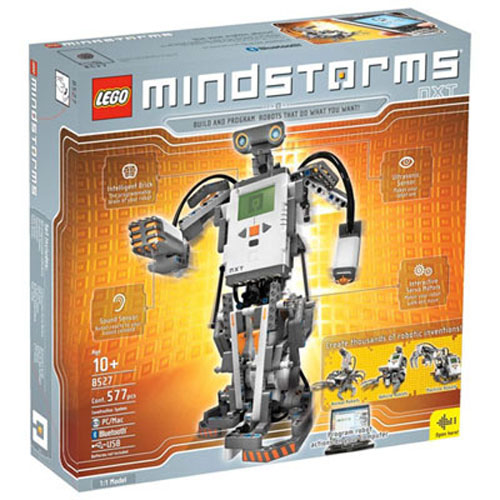
This first edition of LEGO MINDSTORMS NXT (set 8527) was released in 2006 and discontinued in 2009 (replaced by NXT 2.0, see below). It’s official name is simply MINDSTORMS NXT, but more practically speaking, you should read this as “MINDSTORMS NXT 1.0“. Here’s the summarized specs.
- Total of 577 building elements, see full overview
- 1x MINDSTORMS NXT Intelligent Brick
- 3x MINDSTORMS NXT Motors
- 1x MINDSTORMS NXT Ultrasonic Sensor
- 1x MINDSTORMS NXT Sound Sensor
- 1x MINDSTORMS NXT Touch Sensor
- 1x MINDSTORMS NXT Light Sensor
- Set of 7 NXT compatible connector cables
(1x Short [15cm] , 4x Medium [35 cm], 2x Long [50 cm]) - 1x MINDSTORMS NXT “1.0” Programming Software
Observe that this set has only one Touch Sensor, but also a Sound Sensor. The sound sensor measures only volume, sound intensity – it does not recognize voices. Also, the Light Sensor measures light intensity only. For details on sensing colors, see “Color Sensor vs. Light sensor” below. The software version 1.0 can be upgraded for free, see “Upgrading Software” section.
LEGO MINDSTORMS NXT 2.0 (Set number 8547)

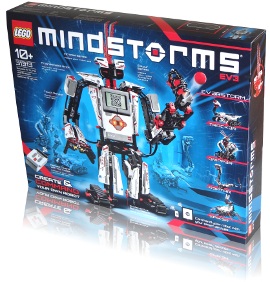
MINDSTORMS NXT 2.0 (8547) came in 2009 to replace the older “NXT 1.0”. This set can presently (2009 – ~) be found in larger toy stores and online. Here’s the summarized specs.
- Total of 619 building elements, see full overview
- 1x MINDSTORMS NXT Intelligent Brick
- 3x MINDSTORMS NXT Motors
- 1x MINDSTORMS NXT Ultrasonic Sensor
- 2x MINDSTORMS NXT Touch Sensor
- 1x MINDSTORMS NXT Color Sensor
- Set of 7 NXT compatible connector cables
(1x Short [15cm] , 4x Medium [35 cm], 2x Long [50 cm]) - 1x MINDSTORMS NXT “2.0” Programming Software
Observe that this set has no Sound Sensor, but instead it has two Touch Sensors. The Color Sensor in this kit can sense both colors and light intensity. For details on sensing colors, see “Color Sensor vs. Light sensor” below.
LEGO MINDSTORMS NXT Education (Set number 9797)
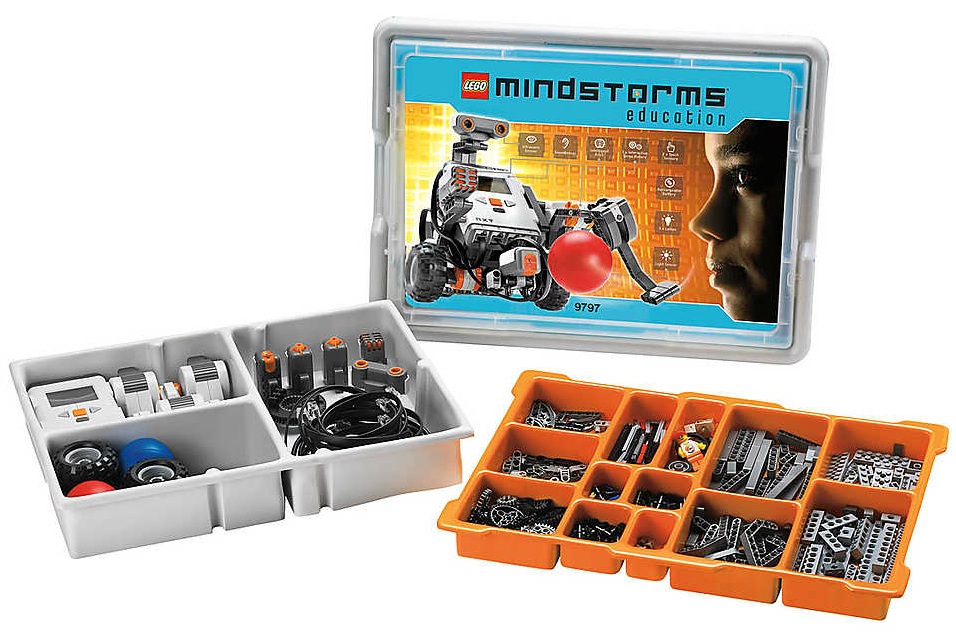
This edition — MINDSTORMS NXT Education Base Set — is specifically designed for schools.
- Total of 431 building elements, see full overview
- 1x MINDSTORMS NXT Intelligent Brick
- 3x MINDSTORMS NXT Motors
- 1x MINDSTORMS NXT Ultrasonic Sensor
- 1x MINDSTORMS NXT Sound Sensor
- 2x MINDSTORMS NXT Touch Sensor
- 1x MINDSTORMS NXT Light Sensor
- Set of 7 NXT compatible connector cables
(1x Short [15cm] , 4x Medium [35 cm], 2x Long [50 cm]) - Set of 3 NXT to 9V system converter cables
- 3x 9V system Lamp
- 1x MINDSTORMS NXT Rechargable Battery. Be sure to check whether or not the charger is included. If not, buy the appropriate charger (see below) separately.
Notice that this set contains more electronic components than any other NXT set, but it contains fewer regular building elements (that’s what the resource pack is for, see below). The included Light Sensor measures light intensity only. For details on sensing colors, see “Color Sensor vs. Light sensor” below. The sound sensor measures only volume, sound intensity – it does not recognize voices.
This Education set does not come with software! MINDSTORMS Education NXT software is sold seperately by LEGO Education.
NXT Education Resource kits
Since the Education base set comes with fewer parts than other NXT Sets, you are limited to what you can build with the available pieces. The so called LEGO MINDSTORMS NXT Education resource set is a supplemental parts pack that expands the Education base set so you can build bigger robots. Note that this set does not contain any motors or sensors. It contains extra beams, gears, wheels and connectors. Until February 2011, LEGO Education sold the “old version” of this set (9648, see contents). The present Resource Set “the new version” is sold as set number 9695 (see contents). When you buy this resource kit, keep in mind that some stores may still have the “old” version in stock, so be sure to look at the set numbers when you buy.
While these sets were designed to be used with the MINDSTORMS NXT Education Base set, they are also perfect part resource kits for LEGO MINDSTORMS NXT “1.0” (8527) and NXT 2.0 (8547).
Comparing MINDSTORMS NXT Sets by parts
Which edition of MINDSTORMS NXT you should buy totally depends on your preferences. The above summarizes the main differences in terms of the electrical components. For an overview and comparison in terms of building elements, click here. Note that the “Rsc. Kit” Column on that page only contains data from the “old” education resource kit (9648).
Color Sensor vs. Light Sensor
The Standard LEGO Light Sensor is present in the NXT 1.0 set and in the Education Base Set. This sensor measures light intensity only, reading a value between 0 (very dark) and 100 (very bright). The sensor has a LED Light that you can switch on and off. When off, you use the sensor to measure ambient light. When on, you use it to measure reflected light of a surface. This way, you can follow a dark line (black) on a light surface (white), because white results in a greater reflection of light, resulting in a higher sensor measurement. Similarly, a yellow surface typically reflects more light than a blue or green surface, but you cannot use the sensor to exactly distinguish colors.
Contrary, the NXT 2.0 set has a Color Sensor. When programmed in Light Sensor Mode, this sensor has the exact same functionality as described above. However, it can also be programmed in Color Sensor mode. When doing so, the sensor can detect 6 different colors: Black, White, Blue, Green, Yellow and Red. A third functionality of this device is Lamp Mode, where it functions as a basic light, optionally Red, Green or Blue.
If you are looking for an additional Light/Color sensor for your projects, consider that in some cases, the standard Light Sensor may be sufficient, and it is half the price of a Color Sensor.
NXT Rechargeable Battery Pack
The NXT can be powered using 6 standard AA batteries (either rechargeable or not). Alternatively, you can buy the rechargeable NXT compatible battery pack (and charger). This may be a bit of an investment at firsts, but the battery packs are useful in various ways. First, no more buying fresh batteries. Second, you can charge the battery pack while you use the NXT, say, while you’re testing programs. Finally, you can charge it in the NXT, there’s no more need to take your complete robot apart just to replace the batteries.
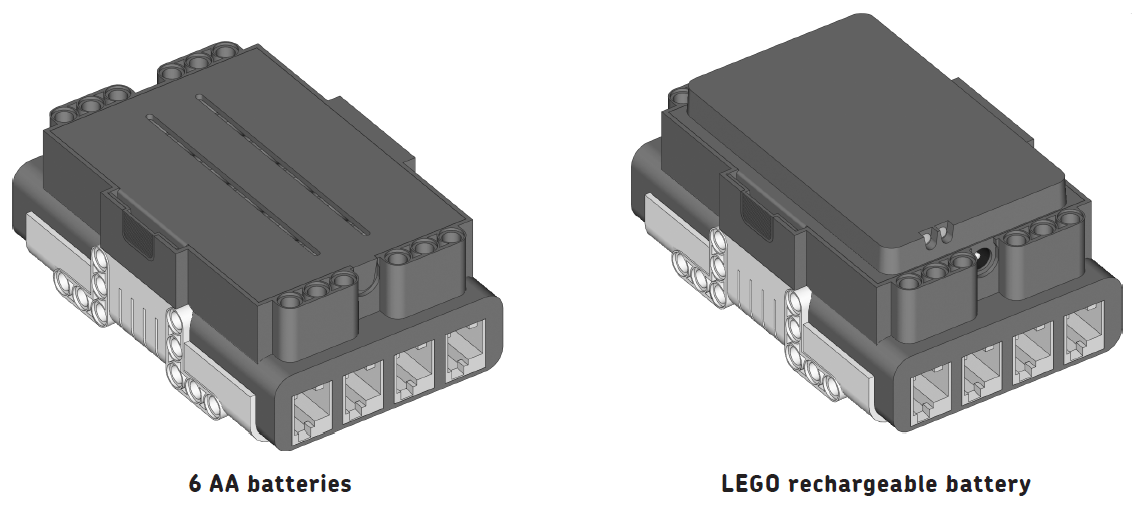
Note that the battery pack will make your NXT Brick one LEGO module “thicker”, as shown in the illustration. Keep in mind that when using this (0r the new) battery, you can’t build all of the standard LEGO Robots like Alpha Rex, simply because there is no space for it. You can, of course, modify them to make them work.
Two rechargeable battery types exist for the NXT:
- “Old” battery (grey colored, shown here): LEGO catalog #9798, with charger: #9833
(This charger is the same transformer as used with the 9V train system) - “New” battery (white colored): A newer, more powerful model: LEGO catalog #9693, with charger: #8887
(This charger is the same transformer as used with the #8878 Power functions rechargeable box)
The NXT Education base set includes one battery and charger (you may want to check with your vender which battery is included!). If you wish to use the battery with your NXT “1.0” or NXT 2.0, you should buy it separately.
Upgrading Software “NXT 1.0” (8527) to “NXT 2.0” (8547)
The NXT 2.0 programming software is nearly the same as the software found in the NXT 1.0 set. However, the NXT 2.0 software has a few new features, and doesn’t crash as often. Since the NXT Intelligent brick is the same in all NXT sets, you can use the NXT 2.0 software with your LEGO MINDSTORMS NXT “1.0” set with no problems.
Once you’ve installed the new software, you must update the NXT firmware by navigating to “Tools”, and selecting “Upgrade NXT Firmware”. This is a harmless operation (and you could go back any time if you wish). To download and install the MINDSTORMS NXT 2.0 software, visit the LEGO website using this link.
Regardless of whether you install the software as described above or from the CD that comes in the NXT 2.0 kit, you’ll need at least a system with the following specifications:
Microsoft Windows Requirements
- Windows XP Professional or Home Edition with Service Pack 2 or newer
- Intel Pentium processor or compatible, 800 MHz minimum (1.5 GHz or better recommended)
- Windows Vista Service Pack 1 or newer
- Intel Pentium processor or compatible, 1 GHz minimum (1.5 GHz or better recommended)
- CD-ROM drive
Apple Macintosh Requirements
- Apple MacOS X v10.4 or v10.5
- PowerPC G3, G4, G5 processor, 600 MHz minimum
- Intel processor (1.3 GHz or better recommended)
- DVD drive
- You may require to install these patches
General System Requirements
- 512MB of RAM minimum
- 700MB of available hard-disk space
- XGA display (1024×768)
- 1 available USB port
- Compatible Blue tooth adapter (optional)
Upgrading your NXT kit
LEGO does not officially sell upgrade packs for your NXT sets. Use the links in the set descriptions to find exactly which pieces you’ll need for an upgrade. There are various way to order separate pieces, but some third parties have done the searching for you and sell complete upgrade packs from NXT 1.0 to NXT 2.0. Notice that this upgrade contains one Touch Sensor, but not a Color Sensor (for most projects, you could use your Light Sensor). Also, building elements will often be in different colors (see example). The same vendor also sells an NXT 2.0 to NXT 1.0 ‘downgrade’ package. Robot Square is not affiliated with this vendor, so please contact the vendor for further specifications.
Buying separate pieces
You can use the separate part overviews or the comparison page to determine element numbers. When you have found a list of elements that you need, you can visit bricklink.com to order each of these pieces. Notice that Bricklink is not one shop, but a collection of smaller shops by individuals who sell their LEGO pieces. This means that if you are trying to place a large order, you may have to order from different shops, which increases your total shipping cost. Usually it’s a good idea to order from a store within your own country to save on shipping.
You can also buy pieces from LEGO pick-a-brick. Note that they use a different element numbering system! You cannot use the part numbers found on the part lists found earlier in this article.
NXT Versions and MINDSTORMS NXT Books
When you buy one of the many instruction books about LEGO MINDSTORMS NXT or NXT 2.0, you should carefully check which NXT set is covered in the book. If you have an NXT 2.0 set and if you buy a book about “NXT 1.0”, you will not be able to build all of the robots described in the book, simply because you might not have all required LEGO pieces. Just the same, if you have an “NXT 1.0” set, an NXT 2.0 book might not work well for you.
In the case of NXT 2.0 books, you can usually find this information in the book title or book description. Older books usually just refer to “MINDSTORMS NXT”, because NXT 2.0 didn’t exist yet at the time of writing. Do a little research (on this page, for instance) before you buy and avoid disappointment.
NOTE: I did my very best to provide accurate and up to date information to this page, but there are no guarantees that there are no mistakes! If you find any inaccuracies, let me know so I can improve the article.